Go to the U of M home page
Showing posts with label myu. Show all posts

Friday, April 24, 2026

Automating access removal in MyU

The process for removing access to the My Advisees and Teaching tabs in MyU has been streamlined and automated. Starting Thursday, April 23, 2026, employment data will be used to identify those who are no longer in an advising and/or instructional role, and will automatically remove access to these self-service functions. In most cases, individuals will not notice this change because they have left the University and their access to University systems has already been limited. 

When individuals are no longer in an advising or instructional role, they no longer have a legitimate educational purpose for accessing private student data accessed through those tabs. Automating this process both aligns with existing practices in Human Resources and helps further ensure data security for student records. 

Thursday, March 26, 2026

Fall 2026 registration for Twin Cities

Fall 2026 registration for the Twin Cities campus begins on Thursday, April 9. On Monday, March 23, all Twin Cities undergraduate students received a MyU notification letting them know that their registration appointment time is available in MyU. Students can also find their appointment time by logging into MyU, selecting the "Academics" tab, and then selecting the "Registration" sub-tab.

Planned PeopleSoft Maintenance April 18-19

MyU and related online services, such as APAS, will be unavailable while the University performs a system upgrade the weekend of April 18 and 19. Service is expected to be restored on Sunday afternoon, April 19. As a result of this upgrade, there will be minor changes to the PeopleSoft interface. You can still access Canvas courses through canvas.umn.edu and University email at mail.umn.edu. Questions? Contact Technology Help.

Friday, March 28, 2025

Fall registration appointment times

Fall 2025 class registration begins Thursday, April 10 for Twin Cities undergraduate students. Registration appointment times were posted for students in MyU on Monday, March 24. Students can find their appointment time by logging into MyU, selecting the "Academics" tab, then selecting the "Registration" sub-tab. Registration times and information on how to register for classes are available on the One Stop website.

If a student needs their appointment time adjusted because of a system error, contact One Stop Student Services (onestop@umn.edu). Include the student's internet ID, student ID, and name.

Friday, September 27, 2024

MyU and PeopleSoft applications unavailable Oct. 19–20

On October 19–20, 2024 (Saturday and Sunday), MyU and other PeopleSoft applications will be unavailable while the University upgrades PeopleSoft. This upgrade helps our PeopleSoft systems remain current and secure and ensures we retain Oracle support.

The timing of the upgrade was set cooperatively to minimize disruption to the University. Please make note of this outage and plan accordingly.

Impact

  • MyU and PeopleSoft applications, and some applications dependent on PeopleSoft, will be unavailable while the upgrade is in progress.
  • Aside from downtime during the weekend, no significant impact is expected.
  • Some who use PeopleSoft will notice some minor changes to the interface.
  • Those who use PeopleSoft will need to clear the cache on their web browser following this upgrade.


Friday, May 31, 2024

Upcoming PeopleSoft unavailability and changes

MyU, PeopleSoft applications, and other related online services, such as APAS, will be unavailable due to a system upgrade on Saturday and Sunday, June 8 and 9. Service is expected to be restored on Sunday afternoon. During the outage, you can check the Service Status website for updates. When work is complete, we recommend that you clear your browser cache before logging into PeopleSoft or MyU. 

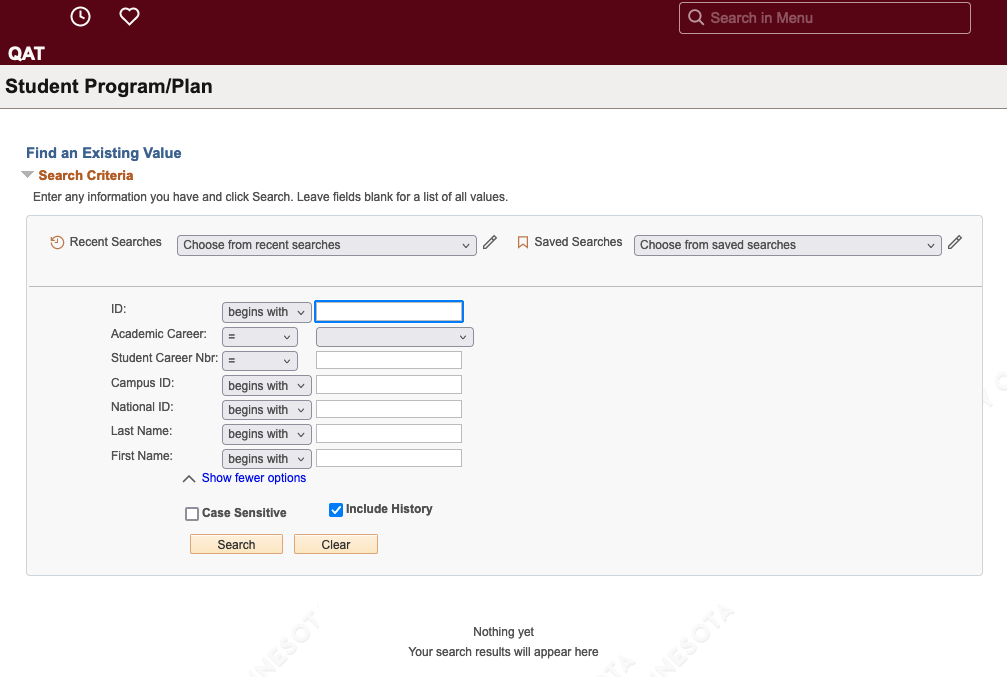
Changes that PeopleSoft Campus Solutions users will notice include a new look and additional options on all search pages. 

The new Student Program Plan search page. The new layout includes more search options and a gray box outlining the search fields.


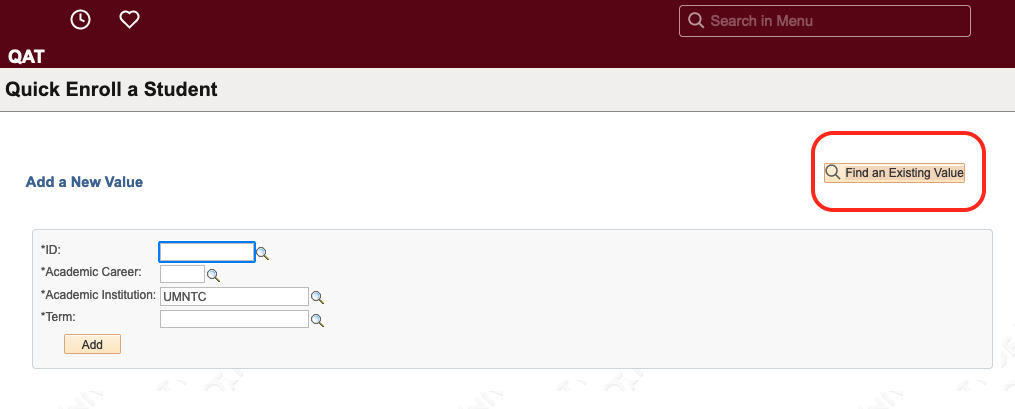
Additionally, a button will replace the tab layout on search pages that include the option to Add a New Value or Find an Existing Value. This includes Quick Enroll a Student, Student Program Plan, Request a Transcript Report, and other pages.

The Quick Enroll a Student search page. On the right, a yellow button titled "Find an Existing Value" is circled in red.


Friday, April 26, 2024

Save the date: PeopleTools upgrade

On June 8 and 9, 2024 (Saturday and Sunday), MyU and other PeopleSoft applications will be unavailable while University IT upgrades the PeopleSoft development platform, PeopleTools, to version 8.60. This upgrade helps our PeopleSoft systems remain stable and secure, and it ensures we retain Oracle support.

Aside from downtime during the weekend, no significant impact is expected, though some PeopleSoft users will notice some minor changes to the interface. This upgrade will also deliver an enhancement: a self-service control to enable Accessibility Mode for end users of the MyU/PeopleSoft self-service systems.


Friday, March 29, 2024

Fall 2024 registration times

Fall 2024 class registration begins Thursday, April 11. Registration appointment times were posted for students in MyU on Monday, March 25. Students can find their appointment time by logging into MyU and selecting the "Academics" tab, then selecting the "Registration" sub-tab. Registration times and information on how to register for classes are available on One Stop.

If a student needs their appointment time adjusted because of a system error, contact One Stop Student Services (onestop@umn.edu). Include the student's internet ID, student ID, and name.

Friday, February 23, 2024

eAgreement

On February 21, all students started receiving a pop-up message in MyU for the annual renewal of the Student Financial Obligations and Responsibility eAgreement. Students are notified in MyU so they have the opportunity to review the updated text on the One Stop website prior to accepting the agreement. Students must accept eAgreement terms by March 6, 2024.