
Showing posts with label APAS. Show all posts
Showing posts with label APAS. Show all posts
Thursday, March 26, 2026
Planned PeopleSoft Maintenance April 18-19
MyU and related online services, such as APAS, will be unavailable while the University performs a system upgrade the weekend of April 18 and 19. Service is expected to be restored on Sunday afternoon, April 19. As a result of this upgrade, there will be minor changes to the PeopleSoft interface. You can still access Canvas courses through canvas.umn.edu and University email at mail.umn.edu. Questions? Contact Technology Help.

Monday, February 2, 2026
February APAS User Group meeting
The next APAS User Group meeting will be Tuesday, February 10 at 2 p.m. via Zoom.
All UMN APAS and TES users are welcome to attend these meetings. Please email apasle@umn.edu to be added to the calendar invite. If you have a question you would like the APAS or TES Team to address during the meeting, please email us ahead of time.
All UMN APAS and TES users are welcome to attend these meetings. Please email apasle@umn.edu to be added to the calendar invite. If you have a question you would like the APAS or TES Team to address during the meeting, please email us ahead of time.
Friday, October 31, 2025
November APAS User Group meeting
The next APAS User Group meeting will be Tuesday, November 11 at 2 p.m. via Zoom.
All UMN APAS and TES users are welcome to attend these meetings. Please email apasle@umn.edu to be added to the calendar invite. If you have a question you would like the APAS or TES Team to address during the meeting, please email us ahead of time!
Friday, July 25, 2025
Quarterly APAS User Group
APAS users are invited to attend our quarterly APAS User Group meeting on Tuesday, August 19 at 1 p.m. over Zoom. APAS and TES best practices, training, and helpful tips and tricks are shared along with timely information. Please reach out to apasle@umn.edu if you do not already have the meeting invite on your Google calendar. You may also submit questions or topics for discussion in advance if there’s something you or your team would like more information about.
Friday, June 27, 2025
Quarterly APAS User Group
APAS users are invited to attend our quarterly APAS User Group meeting on Tuesday, August 19 at 1 p.m. over Zoom. Best practices, training, and helpful tips and tricks are shared along with timely information. Please reach out to apasle@umn.edu if you do not already have the meeting invite on your Google calendar. You may also submit questions or topics for discussion in advance if there’s something you or your team would like more information about.
Friday, May 30, 2025
uAchieve upgrade project
A project to move the University’s on-premises uAchieve (aka APAS) installation to the cloud was kicked off. This project will also include an upgrade to the newest version of uAchieve. The project is still in early stages and a timeline hasn’t been finalized yet, but launch is expected to be in spring 2026. Updates will be shared in the APAS User Group, in the Record, and at Registrar’s Advisory Committee meetings.
Friday, April 25, 2025
Quarterly APAS User Group
APAS users are invited to attend our quarterly APAS User Group meeting on Tuesday, May 6 at 2 p.m., held via Zoom. This quarter’s meeting will cover TES questions related to generic transfer credits, APAS topics related to the Credits in the Major requirement, and declared versus what-if audits. We will also be highlighting resources that APAS users may find helpful. Please reach out to apasle@umn.edu if you do not already have the May 6 meeting invite on your Google calendar.
Friday, July 26, 2024
APAS and GPAS User Group meetings
Academic Progress Audit System (APAS) is the degree audit tool students use to track their undergraduate degree requirements. The next meeting is scheduled for Tuesday, August 20, 2024, from 2:00 p.m. to 3:00 p.m. via Zoom. Best practices, training, and helpful tips and tricks are shared along with timely information. All APAS users are welcome and encouraged to attend. To be added to the calendar invite, email apasle@umn.edu.
The Graduate Planning and Audit System (GPAS) is a tool accessed through MyU that consists of two parts that work together: the planner and the audit. The GPAS User Group meets quarterly in January, April, July, and October on the last Monday of the month. The next meeting is scheduled for July 29, 2024, from 9:00 to 10:30 a.m. via Zoom. Best practices, training, and helpful tips and tricks are shared along with timely information. All GPAS users are welcome and encouraged to attend. If you are interested in attending the meeting, please join the GPAS User Group.
Friday, May 31, 2024
Upcoming PeopleSoft unavailability and changes
MyU, PeopleSoft applications, and other related online services, such as APAS, will be unavailable due to a system upgrade on Saturday and Sunday, June 8 and 9. Service is expected to be restored on Sunday afternoon. During the outage, you can check the Service Status website for updates. When work is complete, we recommend that you clear your browser cache before logging into PeopleSoft or MyU.
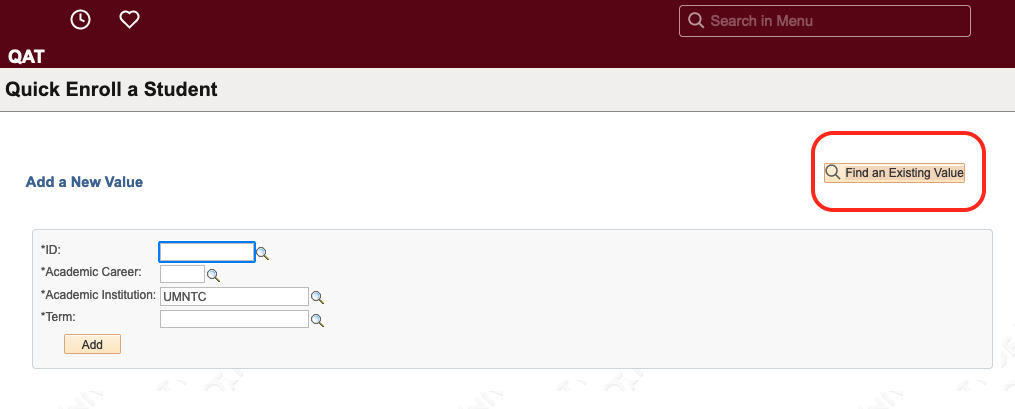
Changes that PeopleSoft Campus Solutions users will notice include a new look and additional options on all search pages.
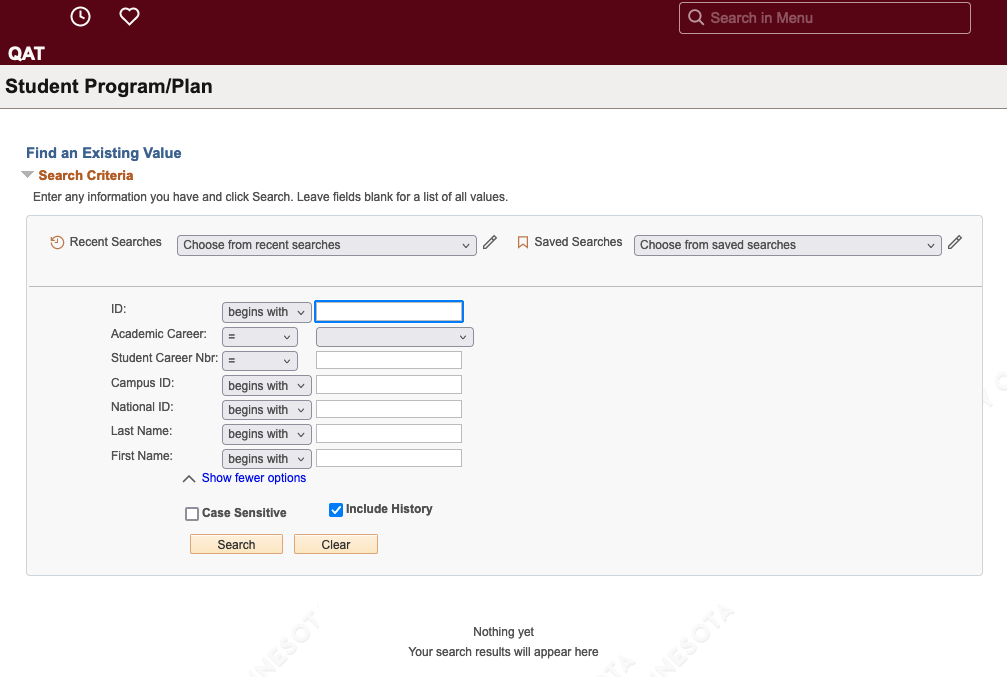
Additionally, a button will replace the tab layout on search pages that include the option to Add a New Value or Find an Existing Value. This includes Quick Enroll a Student, Student Program Plan, Request a Transcript Report, and other pages.
Friday, December 1, 2023
View an APAS without in-progress courses
As we near the end of the fall semester, many advisors and staff will be reviewing students' APAS reports for degree clearance purposes. The APAS Team wants to remind everyone that an APAS can be run without in-progress courses. Please reference the View APAS without in-progress courses job aid.
Friday, July 29, 2022
CollegeSource Users Conference award
At the end of June, 11 University of Minnesota staff attended the 2022 CollegeSource Users Conference in San Diego, CA. CollegeSource is the company that maintains the uAchieve platform that runs APAS. While at the conference, the University of Minnesota System was selected for “Innovation in Advancing System-Wide Positive Student Outcomes” and presented with an award!
This best practice award recognizes the staff who work with uAchieve and the system-wide effort it took to make the Transfer Articulation and Degree Audit (TADA) project (completed in 2020) so successful. It highlights the work they put into the degree audit and transfer articulation best practices implementation during the TADA project, the continued work they do to maintain those best practices, and all the work they have done to make the transfer evaluation processes better for everyone. This was a large, system-wide effort from staff at all of our campuses, and it was a huge success due to everyone’s hard work and dedication to getting it done.
Friday, January 31, 2020
Recent APAS enhancement
A recent enhancement to APAS allows advisors to view the APAS reports run by students.
When the new APAS launched on July 1, 2019, there was an additional function that allowed people to retain and view past run reports. The view of these reports, however, was limited to only those run by people with the same level of access to the system (e.g., advisors could only see reports run by other advisors).
Since then, advisors have provided feedback that it would be useful to see the reports students ran in order to better support them. With the recent enhancement, advisors will now be able to reference the same information their advisees are referencing.
These student-run reports will appear in the same “Completed APAS Requests” page as reports advisors have previously ran for the student. An important distinction to note is that student-run APAS reports are only retained for seven days. However, students will continue to be able to view only reports they run themselves.
When the new APAS launched on July 1, 2019, there was an additional function that allowed people to retain and view past run reports. The view of these reports, however, was limited to only those run by people with the same level of access to the system (e.g., advisors could only see reports run by other advisors).
Since then, advisors have provided feedback that it would be useful to see the reports students ran in order to better support them. With the recent enhancement, advisors will now be able to reference the same information their advisees are referencing.
These student-run reports will appear in the same “Completed APAS Requests” page as reports advisors have previously ran for the student. An important distinction to note is that student-run APAS reports are only retained for seven days. However, students will continue to be able to view only reports they run themselves.
Subscribe to:
Posts (Atom)